What a9a does, which formats are supported, and the shortest path to your first export.
What a9a does
a9a is a tool for adjusting the volume, fades, and loops of audio material — sound effects, voice, BGM — before exporting it.
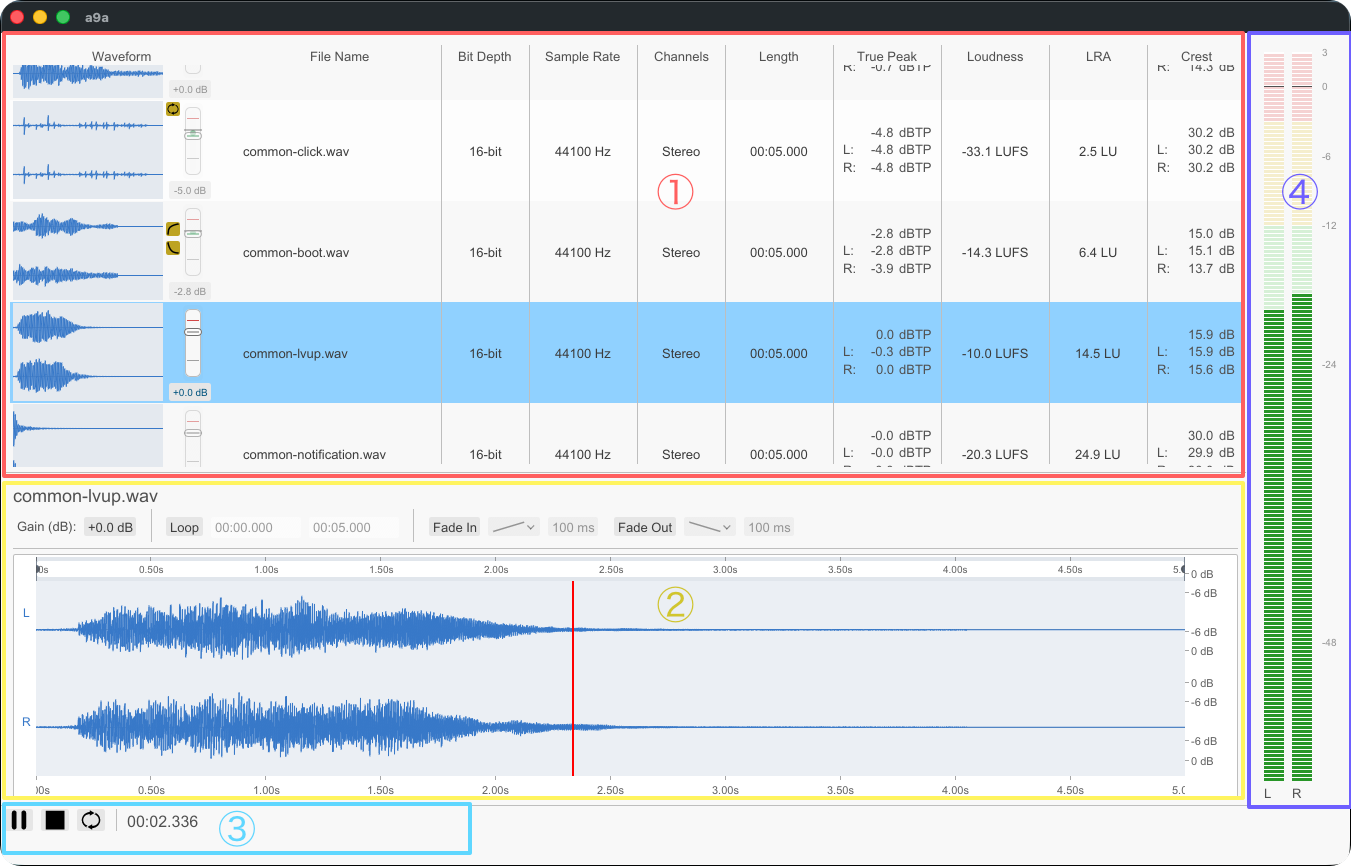
Loaded files are listed side by side, so you can compare waveform, loudness (LUFS), true peak, LRA, crest factor, sample rate, bit depth, channel count, and length across the whole set. When you spot the outliers, you can apply adjustments to just the selected files or to every loaded file at once.
All editing in a9a is non-destructive. Applying gain, loudness, fades, loops, trims, silence trims, or reverse leaves the original file untouched. Your adjustments are written to a file when you bounce (export).
Supported formats
Format
Read
Write
WAV
Yes
Yes
FLAC
Yes
Yes
AIFF / AIFF-C (.aif / .aiff / .aifc)
Yes
Yes
Ogg Vorbis (.ogg / .oga)
Yes
Yes
MP3
Yes
Yes (requires LAME)
AAC (.m4a / .aac, AAC-LC / HE-AAC v1 / HE-AAC v2)
Yes
Yes
Audio with up to 64 channels, including 5.1 and 7.1, can be loaded. The number of channels you can export depends on the format (see Exporting).
Your first five minutes (GUI)
The shortest path from loading files to exporting them at a consistent loudness.
Load files. Choose Open... in the Files menu, or drag and drop from Finder / Explorer onto the list area. You can load multiple files at once.
Compare them. Click the Loudness or True Peak column header to sort, and the files that stand out — too loud or too quiet — surface immediately.
Fix them in one pass. Open Loudness > All... from the Edit menu, enter your target in Target Integrated Loudness (LUFS), and press Apply. The Loudness column updates.
Export. Open Bounce > All... from the Files menu, set Output Directory, and run it.
The window after loading files: 1: list, 2: detail view, 3: transport, 4: level meters
The same thing in the CLI
Start by inspecting the current state with probe.
a9a_cli probe *.wav
Then apply the same loudness adjustment to every file with render. Adding --same-format keeps each output in the format of its input.